Check Performance with Data Insights
Data Insights
Shoplive Data Insights shows broadcast statistics. While a broadcast is running or after it ends, you can see its statistics in Data Insights in the campaign details, and all detailed data can be downloaded as Excel files.
Viewing permissions
Each screen has different viewing permissions.
- Data Insights home screen: company admins
- Campaign detail metrics: in addition to company admins, sellers and top admins of a specific campaign can view them.
- Purchase data: company admins
Data Insights home screen
Set a period with a start and end date to see broadcast performance for that period.
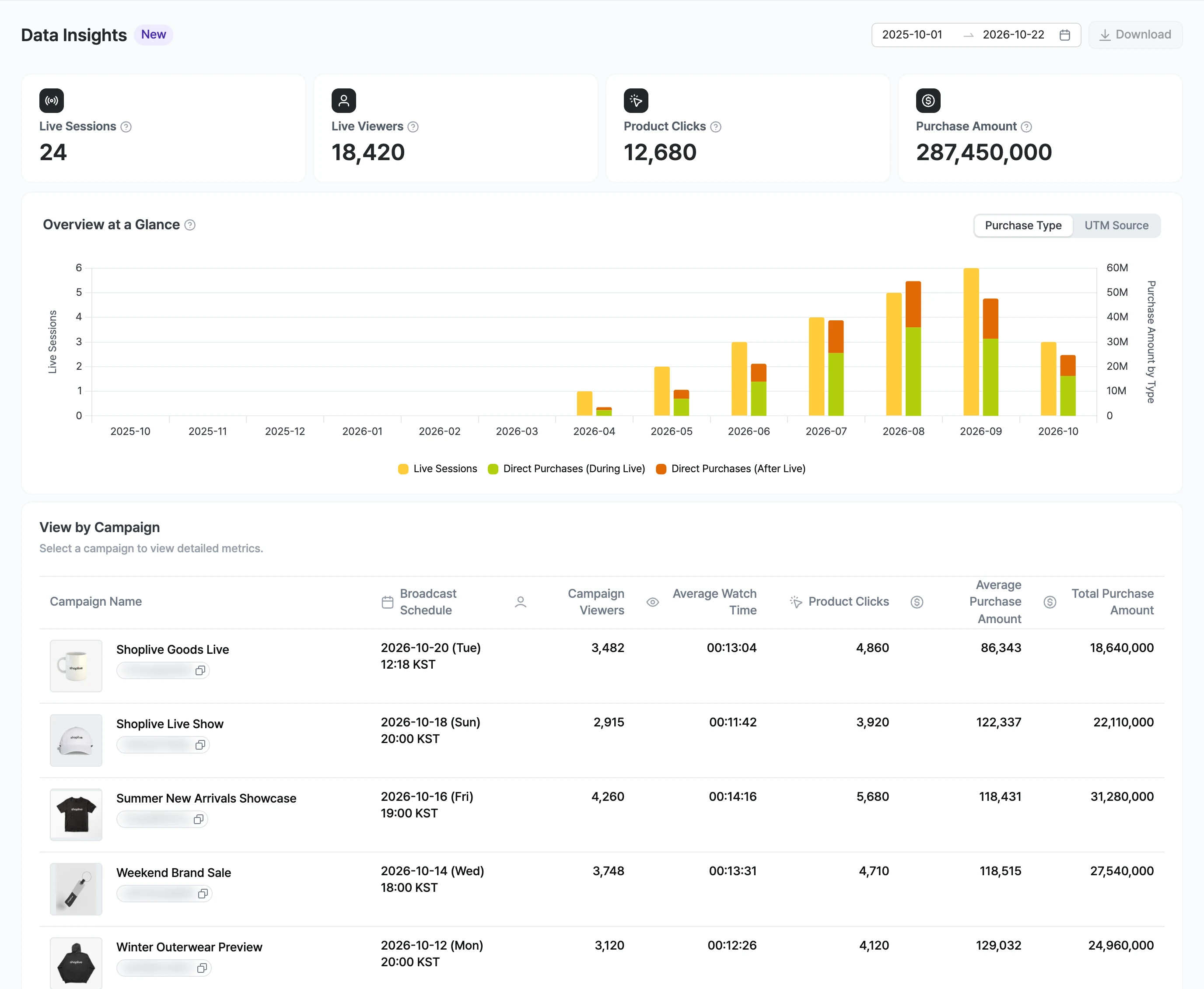
Summary
Item | Description |
|---|---|
Live broadcasts | The total number of live sessions. |
Live viewers | The total number of unique visitors who joined live broadcasts. |
Product clicks | The total number of product clicks during live broadcasts. |
Purchase amount | The total purchase amount from live sessions. Purchase data is collected for up to 28 days after the broadcast ends. |
At a glance
Shows trends in monthly live broadcasts and purchase types. If purchase data isn’t integrated, product click data is shown instead.
Item | Description |
|---|---|
Purchase type | Legend: direct purchases during the broadcast, indirect purchases during the broadcast, direct purchases after the broadcast, product clicks |
UTM traffic source | Switch to purchase amounts by UTM traffic source. Traffic without a UTM value or that can’t be identified is shown as Unidentified or Other. |
If purchase conversion tracking isn’t integrated, an integration notice appears, and you can go to it with the Learn more button. Purchase conversions and revenue are provided to companies that have integrated purchase conversion tracking.
By campaign
Select a campaign to see detailed metrics.
Item | Description |
|---|---|
Campaign name | The campaign title and campaign key are shown. |
Campaign schedule | The campaign schedule. |
Campaign viewers | The campaign’s viewer count. |
Average watch time | The campaign’s average watch time. |
Product clicks | The campaign’s product clicks. |
Average purchase amount | The campaign’s average purchase amount. |
Purchase amount | The campaign’s purchase amount. |
Campaign detail metrics
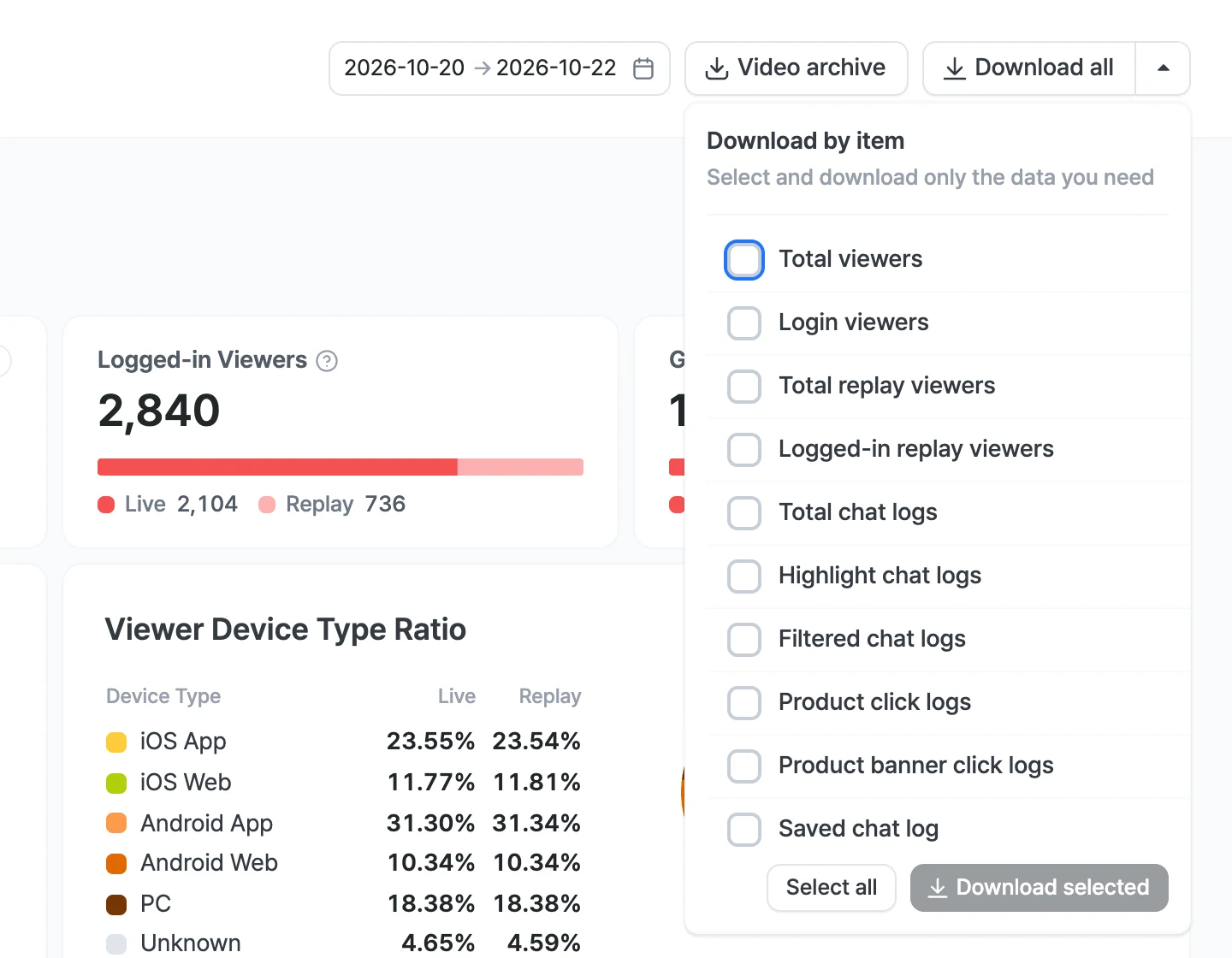
Each campaign’s metrics are split into four sections: Audience, Viewing, Activity, and Purchase. At the top of the screen there are the date range, Video archive, and Download all buttons. Select Video archive to see the name, size, and length of the broadcast video file, and use the download button to save it. From the arrow to the right of Download all, you can use Download by item. On the left, you can view the broadcast video, use Capture scene, and see the date, total duration, start time, and end time. In the More menu on the left, set the Resolution, Like Lottie, and Replay video type.
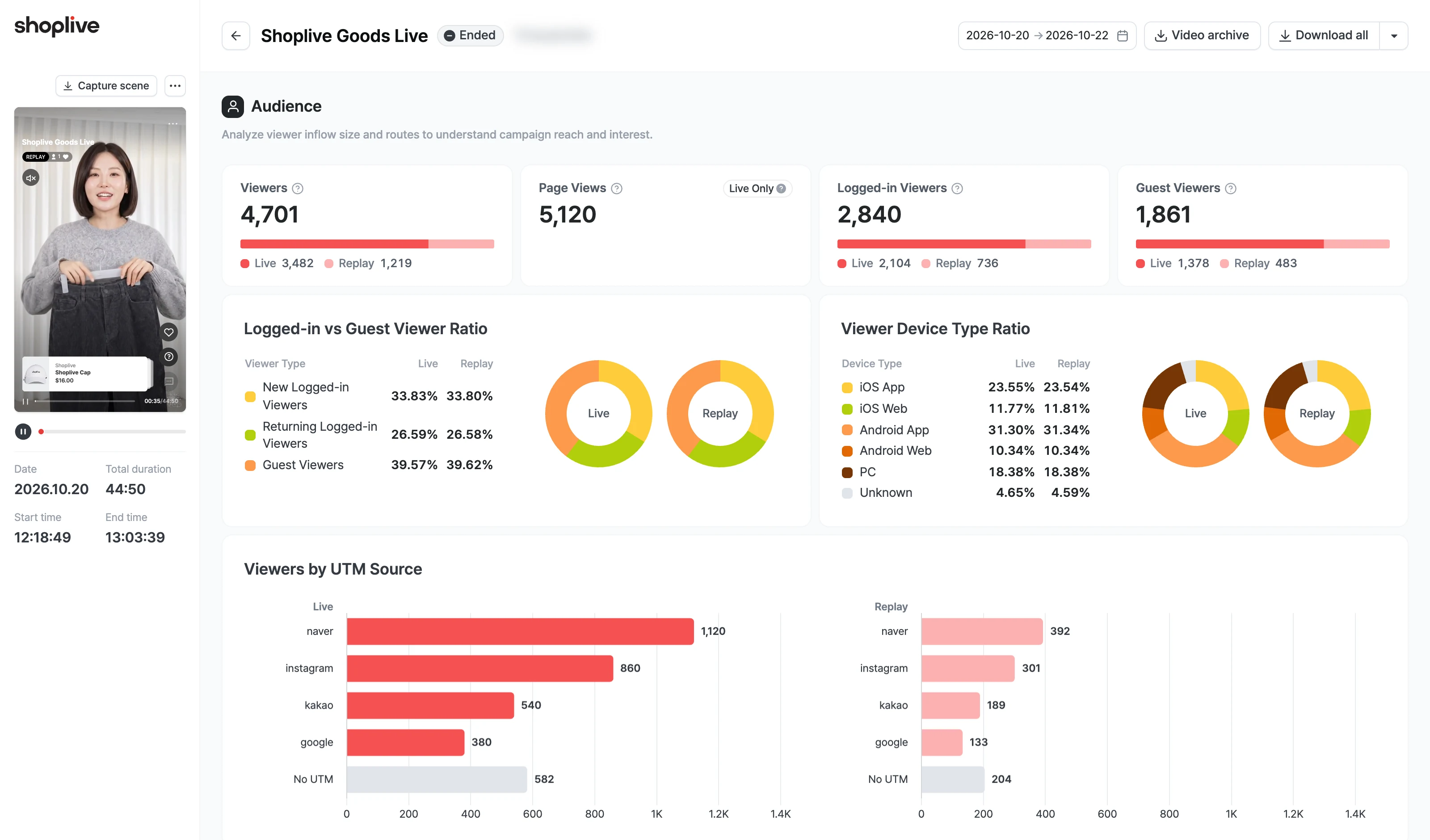
Viewers, Logged-in and Guest Viewers, the logged-in vs. guest ratio, device type, UTM source, and gender and age metrics are shown separately for Live and Replay. Page Views shows Live Only, and the Viewing, Activity, and Purchase sections show Live Data Only.
Audience
Analyzes the scale and sources of viewer traffic to understand the broadcast’s reach and interest.
Item | Description |
|---|---|
Viewers | The total number of viewers who watched the broadcast. |
Page views | The total number of views of the broadcast page. |
Logged-in viewers | The number of viewers who watched while logged in. |
Guest viewers | The number of viewers who watched without logging in. |
Logged-in & guest viewer ratio | The ratio of new logged-in viewers, returning logged-in viewers and guest viewers. |
Viewer device type ratio | Ratios for iOS App, iOS Web, Android App, Android Web, PC and Unidentified. |
Viewers by UTM traffic source | Viewers by UTM traffic source. Traffic without a UTM is shown as UTM not set. |
Viewer gender ratio | The ratio of male, female and unidentified. |
Viewers by gender & age | Viewers by gender and age. |
Viewing
Understands how content is consumed through viewers’ watching patterns.
Item | Description |
|---|---|
Peak concurrent viewers | The maximum number of viewers watching at the same time during the broadcast. |
Average watch time | The average time viewers spent watching the content. |
Concurrent & cumulative viewers | Trends in concurrent and cumulative viewers over time, broken down into guest viewers, new logged-in viewers and returning logged-in viewers. |
Viewers by time spent | Viewers by time spent, broken down into guest viewers, new viewers and returning viewers. |
Activity
Analyzes communication and engagement through viewers’ participation and reaction data.
Item | Description |
|---|---|
Likes | The total number of Likes in the broadcast. |
Viewers who Liked | The number of viewers who left a Like in the broadcast. |
Chats | The total number of chat messages during the broadcast. |
Chatters | The number of viewers who took part in the chat. |
Likes & chat count | Trends in Likes and chats. |
Viewers who took part, by event | The number of viewers who took part in banners, benefits, coupons, recommended events, purchase verification, and quizzes & surveys. |
Purchase
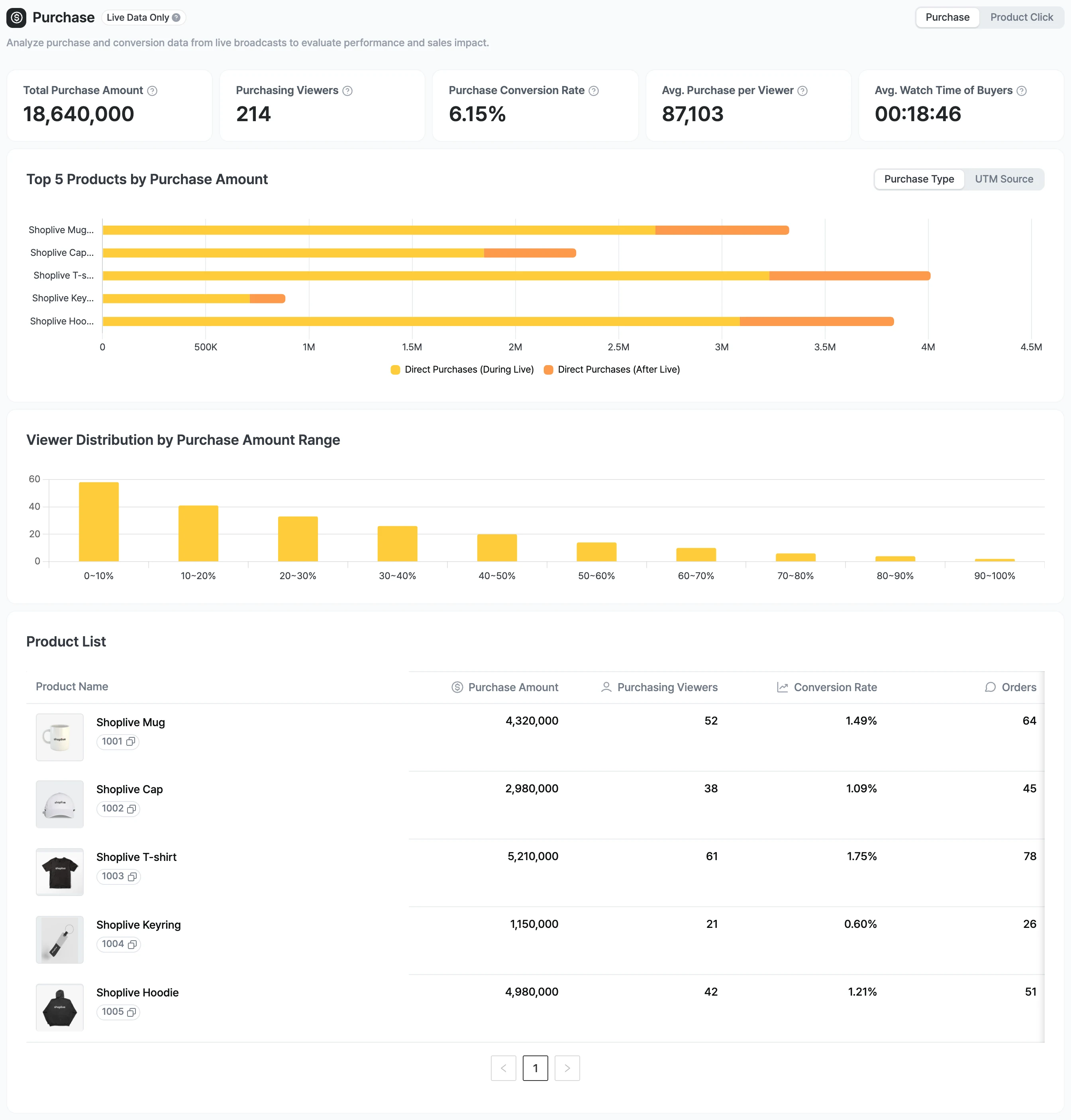
Checks performance and revenue impact through purchase and conversion data from the broadcast. You can switch between Purchases and Product clicks. Purchase data is collected for up to 28 days after the broadcast ends. During the broadcast, some charts show Available after the broadcast ends.
Item | Description |
|---|---|
Purchase amount | The total purchase amount from the broadcast. |
Viewers who purchased | The number of viewers who bought products in the broadcast. |
Purchase conversion rate | The share of broadcast participants who went on to purchase. |
Average purchase amount per buyer | The average purchase amount per buyer who watched the broadcast. |
Average watch time of buyers | The average watch time of viewers who bought products. |
TOP 5 products by purchase amount | Switch between purchase type and UTM traffic source. UTM traffic source is shown as TOP1–TOP5. |
Viewer distribution by purchase amount | The distribution of viewers by purchase amount range. |
Product list | Shows product name, purchase amount, viewers who purchased, purchase conversion rate and number of orders. |
Product clicks
Item | Description |
|---|---|
Product clicks | The total number of product clicks in the broadcast. |
Viewers who clicked products | The number of viewers who clicked products. |
Average clicks | Product clicks divided by the number of viewers. |
TOP 5 products by clicks | TOP 5 ranking by product clicks. |
Product list | Shows product name, product clicks, viewers who clicked products and average product clicks. |
How to download
Click Download all to download every item as one zip file, or choose only the items you want in Download by item.
You can use the Download selected button and select/deselect all. In the Download by item window, you can select and download the following items.
- All viewers
- Logged-in viewers
- All replay viewers
- Logged-in replay viewers
- All chats
- Highlighted chats
- Filtered chats
- Product clicks
- Product banner clicks
- Saved chats
- Event winners
- Quiz participants
- Quiz winners
- Auction participants
- Auction winners
- Purchase verification participants
- Purchase verification winners
- Prize draw winners
- Purchase data
- Popup clicks
The items shown on the screen may differ by account.
Download file fields
All viewers, logged-in viewers
Item | Description |
|---|---|
UID | A unique user value generated by Shoplive. |
User ID | The logged-in user’s unique value (userId). |
Name | The name (userName, name) linked through user authentication. |
Gender | The gender linked through user authentication. |
Age (group) | The age linked through user authentication. |
Viewer type | The viewer type, shown as one of Guest, New Logged-in or Returning Logged-in. |
First live access time | The time the user first joined the live broadcast. The first access time stays the same even if the user rejoins the same broadcast several times. |
Live access count | The number of times the user joined the live broadcast. The sum of the first access and all rejoins after leaving. |
Cumulative live time | The cumulative time the user watched the broadcast. |
Live chats | The number of chats the user sent in the broadcast. |
Live Likes | The number of Likes the user sent in the broadcast. |
Live product banner clicks | The number of times the user clicked the banner above the product list in the broadcast. |
Live product clicks | The sum of the user’s clicks on product cards and product details in the broadcast. |
Live coupon clicks | The number of times the user clicked coupons in the broadcast. |
First replay access time | The time the user first opened the replay. |
Replay access count | The number of times the user opened the replay. The sum of the first access and all rejoins after leaving. |
Cumulative replay time | The cumulative time the user watched the broadcast’s replay. |
Replay Likes | The number of Likes the user sent in the broadcast’s replay. |
Replay product banner clicks | The number of times the user clicked the banner above the product list in the broadcast’s replay. |
Replay product clicks | The sum of the user’s clicks on product cards and product details in the broadcast’s replay. |
Replay coupon clicks | The number of times the user clicked coupons in the broadcast’s replay. |
Watched live | Whether the user watched the broadcast live (O, X). |
Watched replay | Whether the user watched the broadcast’s replay (O, X). |
Custom data | Custom data items linked through user authentication. |
UTM SOURCE | The utm_source value of the traffic source. |
UTM CAMPAIGN | The utm_campaign value of the traffic source. |
UTM CONTENT | The utm_content value of the traffic source. |
UTM MEDIUM | The utm_medium value of the traffic source. |
REFERRER | The page address the viewer came from (referrer). |
Other | Other company-specific items linked as needed by arrangement with Shoplive. |
All replay viewers, logged-in replay viewers
Item | Description |
|---|---|
UID | A unique user value generated by Shoplive. |
User ID | The logged-in user’s unique value (userId). |
Name | The name (userName, name) linked through user authentication. |
Access time | The time the user opened the replay. |
Gender | The gender linked through user authentication. |
Age (group) | The age linked through user authentication. |
Watch time | The time the user watched the broadcast’s replay. |
Likes | The number of Likes the user sent in the broadcast’s replay. |
Product banner clicks | The number of times the user clicked the banner above the product list in the broadcast’s replay. |
Product clicks | The sum of the user’s clicks on product cards and product details in the broadcast’s replay. |
Coupon clicks | The number of times the user clicked coupons in the broadcast’s replay. |
Custom data | Custom data items linked through user authentication. |
Other | Other company-specific items linked as needed by arrangement with Shoplive. |
All chats
Item | Description |
|---|---|
Chat time | The time the chat was written. |
UID | A unique value generated by Shoplive. |
User ID | The logged-in user’s unique value (userId). |
Author | The name (userName, name) of the user who sent the chat. |
Content | The content of the chat sent. |
Deleted | Whether the user’s chat was deleted. |
Reply | The content of the reply. |
Reply time | The time the reply was written. |
Reply author | Information on the operator who wrote the reply. |
Message type | The message type: messages written by users are shown as HUMAN MADE and messages created by the system as SYSTEM MADE. |
Highlighted chats
Item | Description |
|---|---|
Highlight time | The time the operator highlighted the chat. |
Chat time | The time the chat was written. |
UID | A unique value generated by Shoplive. |
User ID | The logged-in user’s unique value (userId). |
Author | The name (userName, name) of the user who sent the chat. |
Content | The content of the chat sent. |
Operator name | The name of the operator who highlighted the chat. |
Filtered chats
Item | Description |
|---|---|
Chat time | The time the chat was written. |
UID | A unique value generated by Shoplive. |
User ID | The logged-in user’s unique value (userId). |
Author | The name (userName, name) of the user who sent the chat. |
Content | The content of the chat sent. |
Banned words | The banned word applied if the chat was filtered for containing a banned word. |
Reason | Why the chat was filtered, such as a banned word or a chat ban. |
Filter type | The type of filtering, such as banned word or other. |
Product clicks
Item | Description |
|---|---|
Product name | The name of the product clicked. |
Product URL | The URL of the product clicked. |
Product code | The product code (SKU) of the product clicked. |
UID | A unique value generated by Shoplive. |
User ID | The logged-in user’s unique value (userId). |
Time | The time the product was clicked. |
Click type | The type of product click (product card, product details). |
Product banner clicks
Item | Description |
|---|---|
UID | A unique value generated by Shoplive. |
User ID | The logged-in user’s unique value (userId). |
Time | The time the product banner was clicked. |
Saved chats
Item | Description |
|---|---|
Saved time | The time the operator saved the chat. |
Chat time | The time the chat was written. |
UID | A unique value generated by Shoplive. |
User ID | The logged-in user’s unique value (userId). |
Author | The name (userName, name) of the user who sent the chat. |
Content | The content of the chat sent. |
Operator name | The name of the operator who saved the chat. |
Event winners
Item | Description |
|---|---|
Campaign key | The campaign key of the campaign where the event was announced. |
Campaign title | The title of the broadcast where the event was announced. |
Popup ID | The event’s popup ID. |
Popup title | The title of the event popup. |
Draw time | The time the event’s winners were chosen and saved. |
UID | A unique value generated by Shoplive. |
User ID | The logged-in user’s unique value (userId). |
Name | The name (userName, name) linked through user authentication. |
Announcement time | The time the event’s winners were announced. |
Chat | The winner’s chat content. |
Quiz participants
Item | Description |
|---|---|
Campaign key | The campaign key of the campaign where the quiz was run. |
Campaign title | The title of the broadcast where the quiz was run. |
Quiz type | The type of quiz run (QUIZ, SURVEY). |
Quiz ID | The popup ID of the quiz run. |
Quiz title | The title of the quiz run. |
Quiz time | The time the quiz was given. |
UID | A unique value generated by Shoplive. |
User ID | The logged-in user’s unique value (userId). |
Name | The name (userName, name) linked through user authentication. |
Gender | The gender linked through user authentication. |
Age | The age linked through user authentication. |
Answer time | The time the answer to the quiz was entered (ISO 8601). |
Answer timestamp | A UNIX timestamp in milliseconds. |
Selected answer number | The number of the answer selected. |
Selected answer | The content of the answer selected. |
Correct | Whether the answer was correct (O, X). |
Quiz winners
Item | Description |
|---|---|
Campaign key | The campaign key of the campaign where the quiz was run. |
Campaign title | The title of the broadcast where the quiz was run. |
Quiz ID | The popup ID of the quiz run. |
Quiz title | The title of the quiz run. |
Draw time | The time the quiz’s winners were chosen. |
UID | A unique value generated by Shoplive. |
User ID | The logged-in user’s unique value (userId). |
Name | The name (userName, name) linked through user authentication. |
Gender | The gender linked through user authentication. |
Age | The age linked through user authentication. |
Auction participants
(Available when using the auction feature)
Item | Description |
|---|---|
Campaign key | The campaign key of the campaign where the auction was run. |
Campaign title | The title of the broadcast where the auction was run. |
Product ID | The ID of the auction product. |
Product title | The name of the auction product. |
Product SKU | The product code (SKU) of the auction product. |
Product URL | The URL of the auction product. |
Starting price | The product’s auction starting price. |
Start time | The product’s auction start time. |
UID | A unique value generated by Shoplive. |
User ID | The logged-in user’s unique value (userId). |
Name | The name (userName, name) linked through user authentication. |
Round | The bid round number. |
Bid price | The price of the bid attempt. |
Currency | The product’s currency. |
Result | Whether the bid succeeded (ACCEPTED, REJECTED). |
Bid time | The time the bid was made. |
Auction winners
(Available when using the auction feature)
Item | Description |
|---|---|
Campaign key | The campaign key of the campaign where the auction was run. |
Campaign title | The title of the broadcast where the auction was run. |
Product ID | The ID of the auction product. |
Product title | The name of the auction product. |
Product SKU | The product code (SKU) of the auction product. |
Product URL | The URL of the auction product. |
Purchase scheme | A separate scheme passed to the winner through a callback. (Using this scheme requires a separate arrangement with Shoplive.) |
Starting price | The product’s auction starting price. |
Start time | The product’s auction start time. |
UID | A unique value generated by Shoplive. |
User ID | The logged-in user’s unique value (userId). |
Name | The name (userName, name) linked through user authentication. |
Round | The bid round number. |
Winning price | The price at which the product was won. |
Currency | The product’s currency. |
Winning time | The time the product was won. |
Purchase verification participants
Item | Description |
|---|---|
Campaign key | The campaign key of the campaign where the event was announced. |
Campaign title | The title of the broadcast where the event was announced. |
Popup type | The type of popup. |
Popup ID | The event’s popup ID. |
Popup title | The title of the event popup. |
Purchase verification start time | The time purchase verification started. |
UID | A unique value generated by Shoplive. |
User ID | The logged-in user’s unique value (userId). |
Name | The name (userName, name) linked through user authentication. |
Gender | The gender linked through user authentication. |
Age | The age linked through user authentication. |
Purchase verification submission time | The time the viewer submitted the purchase verification number. |
Purchase verification number | The purchase verification number (order number) the viewer entered in the player. |
Purchase verification winners
Item | Description |
|---|---|
Campaign key | The campaign key of the campaign where the event was announced. |
Campaign title | The title of the broadcast where the event was announced. |
Popup type | The type of popup. |
Popup ID | The event’s popup ID. |
Popup title | The title of the event popup. |
Draw time | The time the winners were drawn. |
UID | A unique value generated by Shoplive. |
User ID | The logged-in user’s unique value (userId). |
Name | The name (userName, name) linked through user authentication. |
Gender | The gender linked through user authentication. |
Age | The age linked through user authentication. |
Purchase verification number | The purchase verification number (order number) the viewer entered in the player. |
Prize draw winners
Item | Description |
|---|---|
Campaign key | The campaign key of the campaign where the event was announced. |
Campaign title | The title of the broadcast where the event was announced. |
Popup ID | The event’s popup ID. |
Popup title | The title of the event popup. |
Draw time | The time the event’s winners were chosen and saved. |
UID | A unique value generated by Shoplive. |
User ID | The logged-in user’s unique value (userId). |
Name | The name (userName, name) linked through user authentication. |
Announcement time | The time the event’s winners were announced. |
Chat | The winner’s chat content. |
Purchase data
Item | Description |
|---|---|
CAMPAIGN ID | The campaign ID. |
CREATED AT | The creation time. |
ACTIVITY TYPE | The activity type. |
UTM SOURCE | The utm_source value of the traffic source. |
ORDER ID | The order ID. |
UID | A unique value generated by Shoplive. |
PRODUCT ID | The product ID. |
PRODUCT NAME | The product name. |
SKU | The product code (SKU). |
BRAND | The brand. |
CURRENCY | The currency. |
QUANTITY | The quantity. |
UNIT PRICE | The unit price. |
REVENUE | The revenue. |
CANCEL | Whether it was canceled. |
Popup clicks
Item | Description |
|---|---|
CAMPAIGN ID | The ID of the campaign the popup belongs to. |
CREATED AT | The time the click occurred. |
ACTIVITY TYPE | Where the click occurred, shown as LIVE or REPLAY. |
POPUP ID | The popup’s ID. |
POPUP TYPE | The popup type, shown as one of Notice, Banner, Coupon, Quiz·Survey, Benefit, FAQ, Live Purchase Raffle or Draw event. |
POPUP NAME | The popup’s name (title). |
ACTION TYPE | What the click did, shown as one of None, Link(current), Link(new), Download Coupon, Custom Action, More Info Popup or Open Bottom Sheet. |
ACTION TARGET | The target value of the action, such as a link URL or coupon ID. |
UID | A unique value generated by Shoplive. |