Guide · 4 · Run the Broadcast
Console Overview
Key features
The console consists of the areas below. The numbers match the marks on the screen.
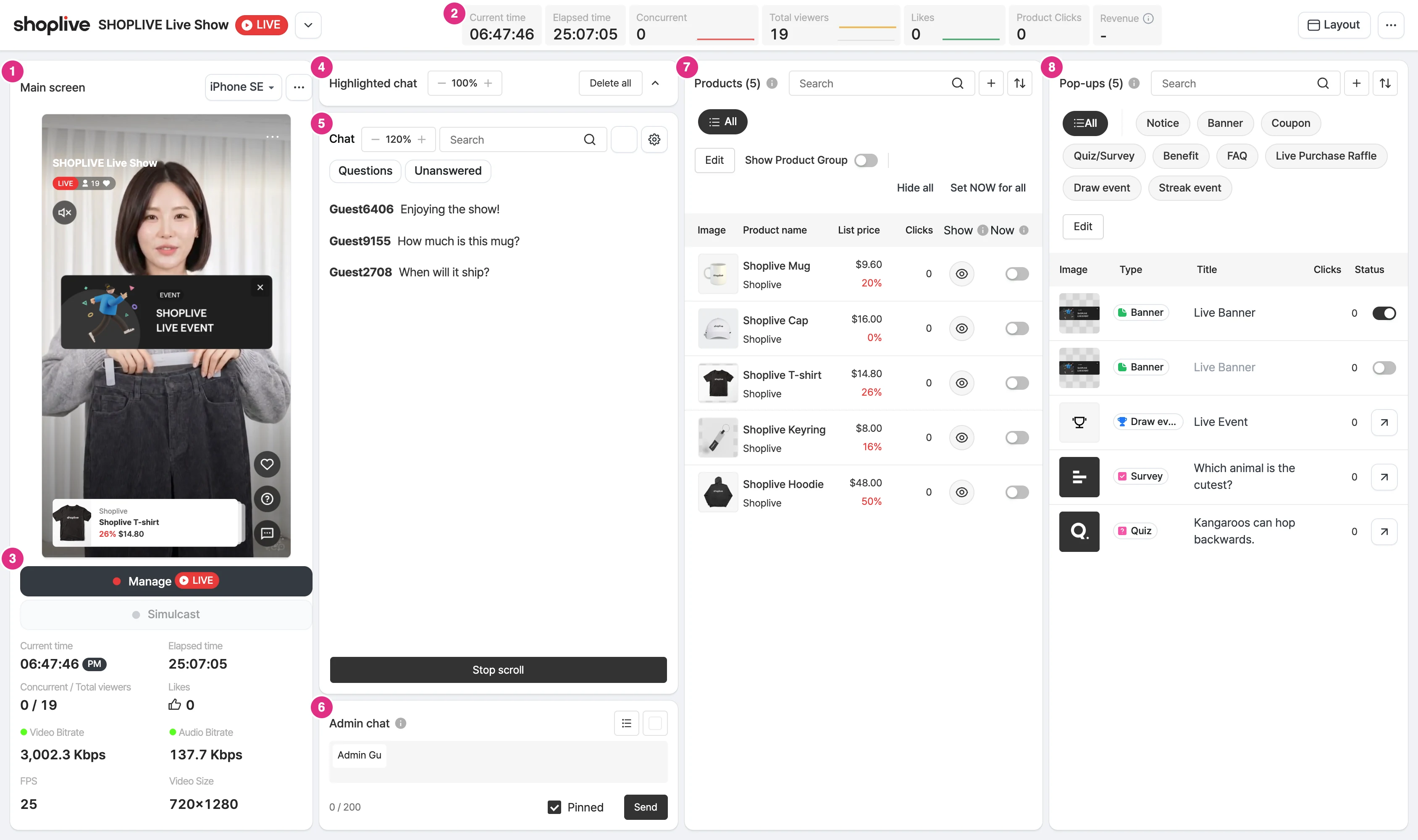
- Main screen: Preview the streamed video. At the bottom, check the current time, elapsed time, viewer count, likes, and video and audio bitrates.
- Real-time metrics: Check the current time, elapsed time, concurrent viewers, cumulative viewers, likes, product clicks, and product purchase amount.
- Manage: Starts and ends the live or rehearsal mode. For details, see Rehearsal → Start the campaign.
- Highlighted chat: Collects the user messages you highlight and shows them on the prompter.
- Chat: Check user chats in real time and search, delete, reply to, mute, and save them. For details, see Manage chat.
- Host chat: Sends host chats and pinned chats.
- Products: Manage the Now label, visibility, and clicks of the products in the campaign, and add products. For details, see Manage products and pop-ups during the broadcast.
- Pop-ups: Add pop-ups to the campaign and manage their visibility.