Data Insights
Shoplive’s shortform Data Insights shows statistics about your shortforms. Detailed data can be downloaded as an Excel or csv file.
Data Insights basic terms
- Detail: a single shortform video that plays after entering shortforms.
- Feed: the area where viewers browse details by flicking up and down after entering shortforms.
- Collection: an area that gathers shortform details in a list layout (vertical scroll-L, vertical scroll-S, horizontal scroll). Collections can be built from all shortforms, by tag, by brand and so on.
- Preview: a PIP-style shortform preview shown on product detail pages.
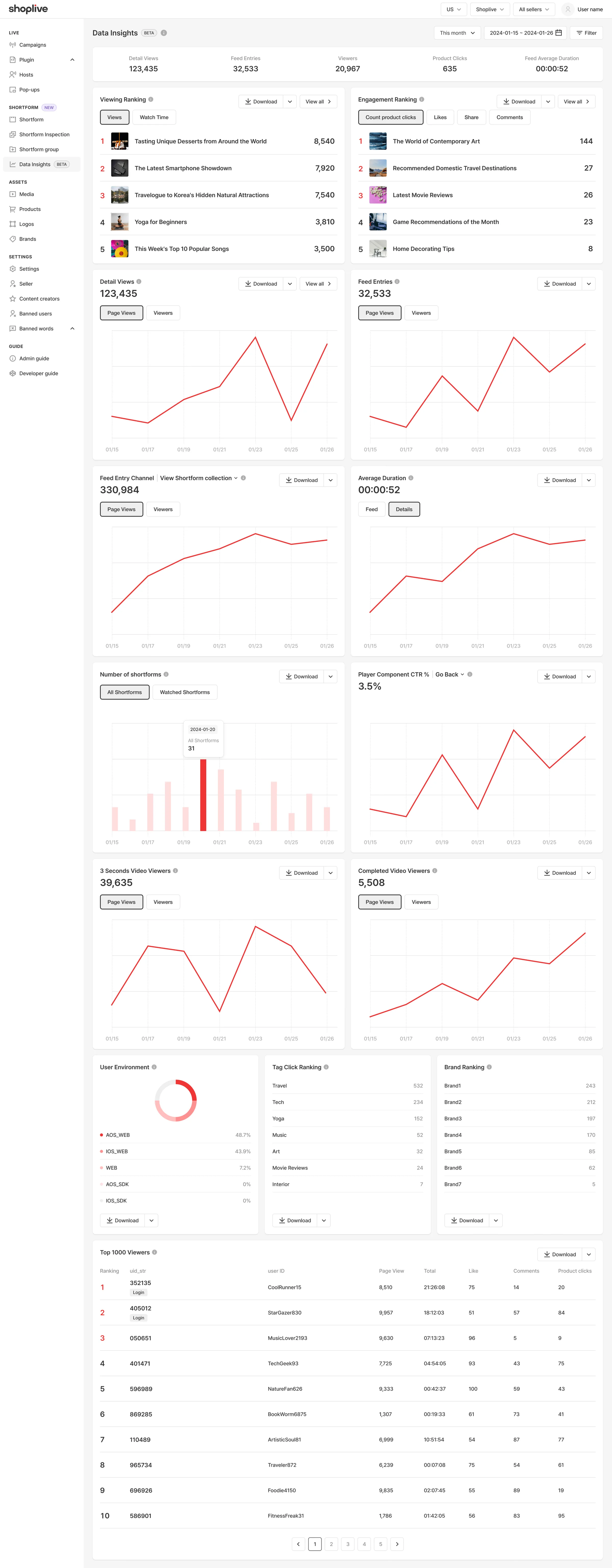
Summary
| Item | Definition |
|---|---|
| Detail views | Total views of shortform details. Based on page views. |
| Feed entries | Total views that entered the feed. Based on page views. |
| Viewers | The number of users who used the shortform service. This includes both viewers of shortform details and visitors to pages with collections and previews. |
| Product clicks | Total product clicks. |
| Average time in feed | Viewers’ average time spent in the feed. |
Viewing rankings
| Item | Definition |
|---|---|
| Views | Shows the shortforms with the most detail views. When page views are equal, ranking is by watch time; when watch time is also equal, the most recently registered ranks higher. |
| Watch time | Shows the shortforms with the most detail watch time. When watch time is equal, ranking is by page views; when page views are also equal, the most recently registered ranks higher. |
Viewer engagement rankings
| Item | Definition |
|---|---|
| Product clicks | Shows the ranking of shortforms whose products were clicked the most. When product clicks are equal, page views and watch time are both considered in the ranking. |
| Likes | Shows the ranking of shortforms by number of likes. When likes are equal, page views and watch time are both considered in the ranking. |
| Shares | Shows the ranking of shortforms by shares. When shares are equal, page views and watch time are both considered in the ranking. |
| Comments | Shows the ranking of shortforms by number of comments. When comments are equal, page views and watch time are both considered in the ranking. |
Filters and period
- You can filter by login status (All/Logged in/Not logged in) and viewing environment (PC Web/iOS·Android Web/iOS·Android SDK).
- Choose the period from the Today, Last 7 days, This month and Last month presets. You can view up to 1 year of data.
- A shortform ranking page and a product click detail window are provided.
- Data can be downloaded in csv or xlsx format.
Other Data Insights
| Item | Definition |
|---|---|
| Detail views | Shows how many times detail shortforms were viewed, by page views and by viewers. |
| Feed entries | Shows the total entries into the shortform feed, including URL entries, by page views and by viewers. |
| Feed entry channels | Shows views and CTR of collections or previews, by page views and by viewers. |
| Average time spent | Shows viewers’ average time spent in the shortform feed and in detail shortforms, separately. |
| Number of shortforms | Shows the total number of registered shortforms and the number of shortforms played at least once in the feed, separately. |
| Player component clicks | Shows the click rate of each component on the shortform detail player screen. You can also see clicks on the author profile, outlink button, body, tags, comment writing and mute/unmute. |
| Watched 3+ seconds | Shows data on videos watched for 3 seconds or more in shortform details, by page views and by viewers. |
| Watched to the end | Shows data on videos watched to the end in shortform details, by page views and by viewers. |
| Viewing environment | Shows the environments in which viewers used the shortform service. |
| Tag click rankings | Shows the ranking of the most-clicked tags registered on shortform details. |
| Brand view rankings | Shows the ranking of brands registered on shortform details with the most detail views. |
| Collection CTR rankings | Shows the CTR ranking of collections by group. |
| Top 1000 viewers | Shows the ranking of the 1,000 viewers who watched shortforms the most. Ranked by total watch time; when total watch time is equal, the one with more likes ranks higher. |
What do the product-related ratios in player component clicks mean?
- Product detail clicks (all shortforms): the ratio of product detail clicks to the PV of all shortforms.
- Product detail clicks (shortforms with products): the ratio of product detail clicks to the PV of shortforms that actually have products registered.
- Product list expansion (shortforms with products): the ratio of product list expansions to the PV of shortforms that actually have products registered.
- Product detail clicks (product list expansion): the ratio of product detail clicks to product list expansions.
Purchase conversion dashboard
- Key metrics by day
- Shortform funnel (collection+preview → feed → watched 3+ seconds → product click → purchase)
- Feed entry path comparison (collection/preview/direct UTM)
- Top 10 converting shortforms (sorted by sales amount/units sold/purchase conversion rate)
- Daily details
- Cart breakdown
For performance by entry path, see the "View Performance by Entry Path" document.