.png)

Step5. Coupons
- Print
Step5. Coupons
- Print
Article summary
Did you find this summary helpful?
Thank you for your feedback!
handleNavigation
A callback function that is invoked when a coupon is clicked.
The URL is provided so that you can implement navigation logic according to your app’s requirements.
Parameter name | Type | Description |
|---|---|---|
url | URL | The predefined link URL |
Sample Code
import 'package:url_launcher/url_launcher.dart';
_shopLivePlayer.handleNavigation.listen((data) {
  launchUrl(Uri.parse(data.url), mode: LaunchMode.externalApplication);
});
API Reference: handleNavigation
handleDownloadCoupon
A callback function that is invoked when a coupon is clicked.
The coupon ID is provided so that you can implement coupon issuance logic in your app.
Parameter name | Type | Description |
|---|---|---|
couponId | String | Coupon ID |
Sample code
import 'package:shoplive_player/shoplive_player.dart';
import 'package:rxdart/rxdart.dart';
class MainPage extends StatefulWidget {
  const MainPage({Key? key}) : super(key: key);
  @override
  State<MainPage> createState() => _MainPageState();
}
class _MainPageState extends State<MainPage> {
  late final ShopLivePlayer _shopLivePlayer = ShopLivePlayer();
  final CompositeSubscription _subscriptions = CompositeSubscription();
  @override
  void initState() {
    super.initState();
    _initListener();
  }
  void _initListener() {
    _shopLivePlayer.handleDownloadCoupon.listen((data) async {
      await handleDownloadCoupon(data.couponId);
    }).addTo(_subscriptions);
  }
  Future<void> handleDownloadCoupon(String couponId) async {
    // Implement coupon issuance logic
    // ...

    // Send coupon issuance result
    await _shopLivePlayer.sendDownloadCouponResult(
      couponId: couponId,
      success: true,
      message: "Coupon download success!",
      popupStatus: "KEEP",
      alertType: "ALERT",
    );
  }
  @override
  void dispose() {
    _subscriptions.dispose();
    super.dispose();
  }
  @override
  Widget build(BuildContext context) {
    return Scaffold(
      appBar: AppBar(title: const Text('Shoplive Example')),
      body: const Center(child: Text('Shoplive')),
    );
  }
}
API Reference: Coupon, handleDownloadCoupon
User-define
This section describes how to integrate coupons when the Coupon Click Event is set to User-defined.
You can define the required information in JSON format and include it in the payload object.
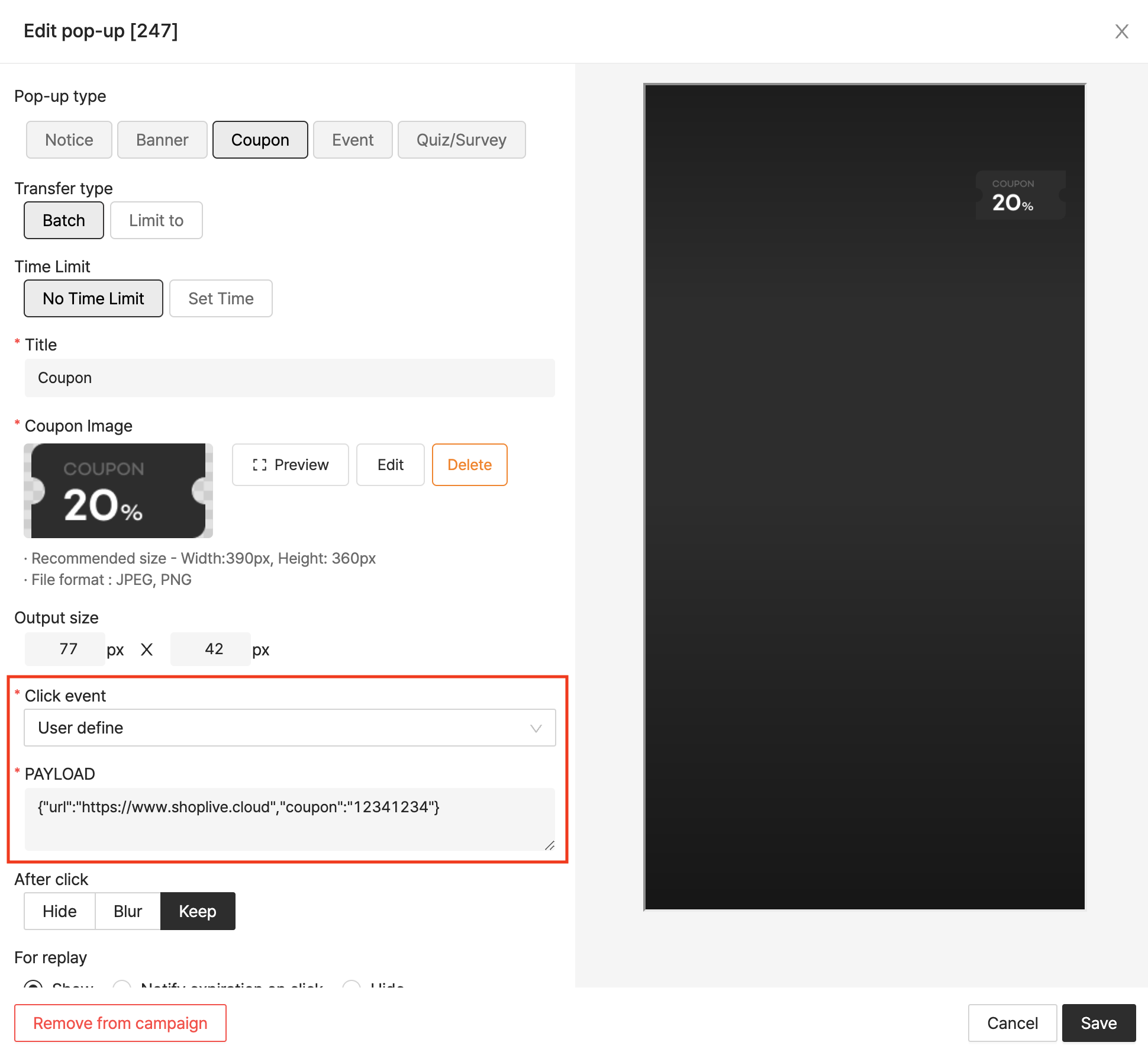
handleCustomAction
A callback function that is invoked when a coupon is clicked.
The defined information(payload data) is delivered so that you can implement custom logic in your app.
Parameter name | Type | Description |
|---|---|---|
id | String | Unique identifier of the popup. |
type | String | Popup type (COUPON, BANNER, NOTICE) |
payload | String | User-defined payload data (JSON string) |
Sample Code
_shopLivePlayer.handleCustomAction.listen((data) async {
  // You can find the sendCustomActionResult parameters
  // in the API Reference link below.
  await _shopLivePlayer.sendCustomActionResult(
    id: data.id,
    success: true,
    message: "success!",
    popupStatus: "SHOW",
    alertType: "ALERT",
  );
});
API Reference : Coupon, handleCustomAction